
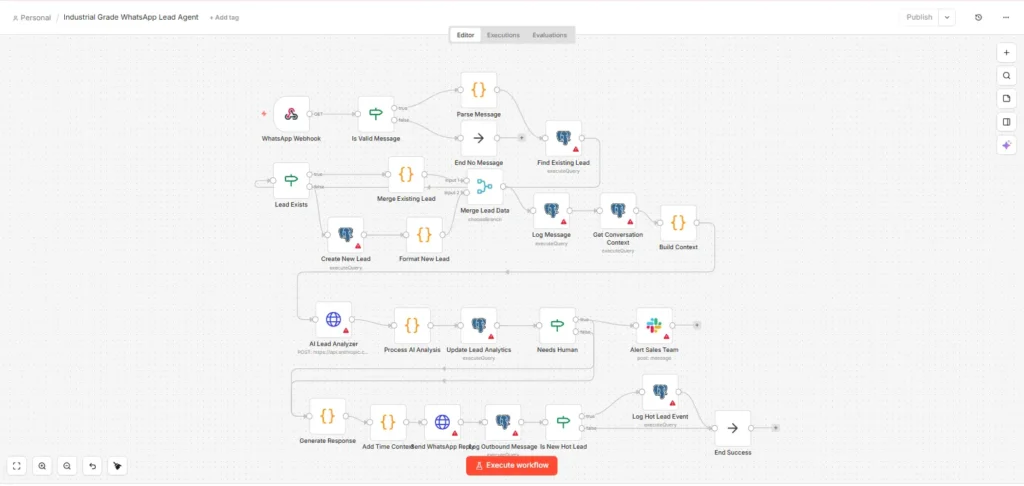
The word “n8n Automation” is trending since last year (to be precise), people are building countless ‘n8n workflow templates’ to automate their repetative tasks, So today I’m gonna teach you how to build a WhatsApp lead agent using meta whatsapp cloud API, slack, postgresql database. I will mention the features & functions of this workflow in later section and let me remind you that this blog is for those who don’t just want to copy the workflow but understand it too, I have uploaded the n8n workflow template in JSON file at the end of this blog, you can just download it and use it but i prefer you to build this workflow node by node yourself for self-improvment (instructions provided).
Well hello guy’s my name is…(i prefer you call me by my nickname) ‘axiomcompute’ & let’s start this interesting session,
Industrial Grade WhatsApp Lead Agent: Features
The features of this lead Agentic AI is as follows:-
Agentic AI
Intelligent systems that autonomously plan, make decisions, and take action to achieve specific goals with minimal human supervision
- Real Time Whatsapp Message Handling:- This one run 24/7 without human intervention, recieve messages almost instantly.
- Data Extraction:- It extract phone number, name, message string automatically.
- Phone Number Formater:- Since this workflow is made specifically for india, that’s why i’ve added this which just formats the number from any format into +9198xxxxxxxx, the reason being it ensure databse consistency & prevents duplicates.
- Database:- I have added a real database instead of google sheets to keep things professional which stores name, number, message, category, intent, timestamp.
- Duplicate Lead prevention:- An important feature offcourse.
- Lead Classification by AI:- Future ready feature and quite usefull indeed for example, this one classify the messages belongs to sales, support, spam, product_question.
- Lead Intent Detection:- Yet another useful feature using AI, this one classifies the user intent to buy, info, pricing, greeting….
- Smart Reply Routing:- Simply put, this one reply the user’s in real time based on their intent for example let’s say you wanna enquire about pricing’s so the bot will reply you with pricings related answers not support flow.
- WhatsApp Template Reply:- this one is simply a template based first message.
- Data Logging:- This one’s quite useful too, it stores message history, user message text, AI classification results, AI intent results, each with timestamp.
- Bot Safety Features:- I thought this one is kinda important to prevent errors/API-draining/workflow-breakage/number-format-inconsistency.
- Scalable:- This on is on Enterprise level workflow template so it’s bound to be scalable.
- Modular Structure:- This one is designed to expand easily i.e. follow-up flows, AI memory, CRM Integration, Broadcasting, Human handover etc..
That’s it, these are the basic core foundations. Hope you enjoy the building journey with me ahead!
Industrial Grade WhatsApp Lead Agent: Basic Node knowledge
Since Im gonna explain you ‘how to build industrial grade whatsapp lead agent on n8n’ and you will be building this yourself So it’s very crucial for you to atleast have a grasp over the basic core nodes which is gonna be used in this workflow,
- Webhook Node:- This one is the first and absolutely important node for our workflow, without it the workflow won’t start, this node is for receiving incoming WhatsApp messages from Meta Cloud API.
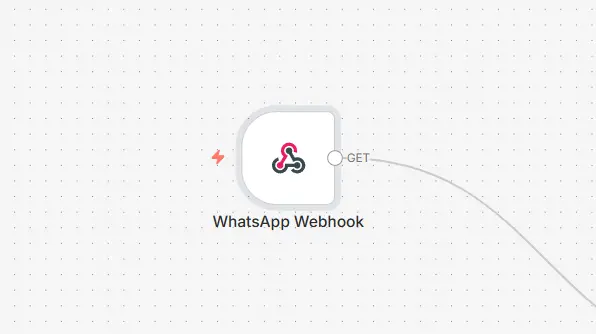
E.g. The underlying algorithm should be like this, when someone send’s the message to your WhatsApp number then that number will then get pulled by WhatsApp Meta Cloud API to this node through a feature called webhook (we don’t need to delve deeper) you could think that webhook acts as bridge to transfer data from one point to another over Internet, In our case the raw data should looks like this,
{
  "entry": [{
    "changes": [{
      "value": {
        "messages": [{
          "from": "919876543210",
          "profile": { "name": "John" },
          "text": { "body": "hello" }
        }]
      }
    }]
  }]
}
as you can see this is the example skeletal structure of JSON data.
- Code Node (formerly Function node):– It simply transform the RAW DATA in clean data (Human readable data) by using javascript code, It acts as a container in which you can write code in javascript or python to manipulate data.
E.g.
const body = items[0].json.entry[0].changes[0].value;
const msg = body.messages ? body.messages[0] : null;

function normalize(num) {
  if (num.startsWith('+')) return num;
  if (num.startsWith('91')) return '+' + num;
  return '+91' + num;
}

return [{
  json: {
    wa_number: normalize(msg.from),
    wa_name: msg.profile ? msg.profile.name : 'Unknown',
    wa_text: msg.text ? msg.text.body : ''
  }
}];
This code here simply acts a engine so when we input Raw Data it processes tha data & outputs that Data into a more cleaner data (precise fields) then transfers ahead.
{
  "wa_number": "+919876543210",
  "wa_name": "John",
  "wa_text": "hello"
}
This is the output of the data from 1st point, rest assured as you won’t have to deal with code’s even if you are a non-developer reading this.
- Postgresql Node:- This is our database node which is very crucial, the leads will be stored here, updated here etc..
- OpenAI Node:– This is AI Layer node which detect intent’s and classify data into different categories.
- HTTP Request Node:- Simply, this node is almost like an all-rounder node to talk over internet in n8n, weather you have to send, receive, post, get requests over internet this node is excellent choice beacuse of it’s flexibility. The work of this node in our workflow is to send message from your whatsapp number.

This nodes are the foundation of our workflow template.
Now we will go step-by-step over on how to build this workflow
Industrial Grade WhatsApp Lead Agent: Helping you build node by node
Its gonna be quite the long session as there are around 27 nodes, let’s get to know each node:
Node 1: Whatsapp webhook
As stated earlier, Its the entry point of entire workflow.
Node 2: Is Valid Message?
WhatsApp send many webhook events through Meta API, not just messages. So, to ensure that only messages pass through this node & is adopted to filter out these before doing any processes.
{
  "parameters": {
    "conditions": {
      "boolean": [
        {
          "value1": "={{ $json.entry && $json.entry[0].changes[0].value.messages }}",
          "value2": true
        }
      ]
    }
  },
  "name": "Is Valid Message?",
  "type": "n8n-nodes-base.if",
  "typeVersion": 1,
  "position": [460, 400]
}
In this particular Raw JSON code you can see that there are 2 values namely, value 1 & 2, the value 1 contains this expression {{$json.entry && $json.entry[0].changes[0].value.messages}} this code checks if the message’s exist in previous node’s output or not. If true then the data will flow from TRUE branch if Not the workflow will stop.
Node 3: Parse & Normalize Message
As name suggests here the messages gets normalized, the data send from Whatsapp is deeply nested an inconsistant so this node extracts relvent fields, normalize phone numbers to E.164 format (+919876543210), handle all message types, create a clean structure for downstream nodes.
{
  "wa_number": "+919876543210",
  "wa_name": "John Doe",
  "wa_id": "wamid.xxx",
  "message_text": "I want to buy your product",
  "message_type": "text",
  "media_id": null,
  "location_data": null,
  "timestamp": "2024-01-15T10:30:00Z",
  "business_phone_id": "123456789",
  "is_duplicate": false,
  "lead_id": null,
  "conversation_context": []
}
Here is the example of cleaned format output which will be fowarded to the next node.
Node 4: Find Existing lead
Before creating a new lead in Database we must check if this phone number already exists.
Internal settings,
{
  "parameters": {
    "operation": "executeQuery",
    "query": "SELECT id, wa_number, wa_name, lead_status, lead_score, lead_category, intent, conversation_count, last_message_at, assigned_to, tags, created_at FROM whatsapp_leads WHERE wa_number = $1 ORDER BY created_at DESC LIMIT 1;",
    "options": {},
    "queryParams": "={{ [$json.wa_number] }}"
  },
  "name": "Find Existing Lead",
  "type": "n8n-nodes-base.postgres",
  "typeVersion": 2.5,
  "position": [940, 300]
}
Node 5: Lead Exists?
If previous node outputs some data then lead does not exists, In this case a new record will be created. In opposite case the existing lead will be updated.
{{ $json.length > 0 }}This value checks arrays length, is array is empty means no lead found and vice versa.
Node 6: Merge Existing Lead
If the lead already exists, this node combines the new data in existing data inside the database.
Node:7 Create New Lead
As the name suggests, this node is to fill the database with new lead’s details.
Node 8: Format New Lead
The INSERT query returns database result format. So, we need to merge it with original message data to match the structure from “Merge Existing Lead (Node 6)”.
Node 9: Merge Lead Data
This is Convergence point, for both branches (cluster of parallel nodes).
Note:- Merge node simply merge the data of two or more parallel node into one.
Node 10: Log Message
After merge every message (conversation history, audit trail, analytics, context for AI Analysis) get’s logged here.
Node 11: Get Conversation Context
This node here is before AI analysis which is to help AI node give context. Knowing previous messages helps determine: Is this a follow-up question? Has sentiment changed? What was discussed before? this node limits 5 messages (enough context without overwhelming AI).
Node 12: Build Context
Prepares AI input because raw database results needs formating for AI, So this converts structured data into readable conversation format.
Example Output,
Customer: Hi, I'm interested in your product
Agent: Hello! Thanks for reaching out. What would you like to know?
Customer: What's the pricing?
Agent: Our plans start at $99/month. Would you like details?
Customer: Yes, I want to buy the premium plan
Node 13: AI lead Analyzer
After context is built this node here which is the brain of the workflow analyzes the message and return structured classification.
Node 14: Process AI Analysis
This node processes Raw AI output which includes Parse JSON (handle errors), Calculate lead score adjustments, Determine lead temperature, Decide if human handoff needed.
Since sometimes add markdown we clean it and handle failures gracefully example output
// Intent scoring
const intentScores = {
  buy: 30,      // Highest value - ready to purchase
  demo: 20,     // High interest
  pricing: 15,  // Evaluating
  info: 5,      // Exploring
  followup: 10, // Engaged
  complaint: -5, // Negative signal
  greeting: 0,  // Neutral
  other: 0
};
scoreAdjustment += intentScores[analysis.intent] || 0;
Since “Buy” intent is 6x more valuable than “info” based on sales funnel position.
// Lead temperature
let temperature = 'cold';
if (newScore >= 70) temperature = 'hot';
else if (newScore >= 40) temperature = 'warm';

/* 0-39: Cold (needs nurturing)
40-69: Warm (showing interest)
70-100: Hot (ready to close) */

// Human handoff detection
const needsHuman =
  analysis.sentiment === 'frustrated' ||
  analysis.category === 'support' ||
  analysis.urgency >= 4 ||
  newScore >= 80;
Human handoff detection is because Frustrated customers → Escalate immediately, Support issues → Need human touch, Urgency 4-5 → Time-sensitive, Score 80+ → High-value, don’t risk losing them.
Node 15: Update Lead Analytics
This node saves the AI insights to database, since AI analysis needs to be saved for CRM visibility, Future context, Reporting/analytics, sales team dashboard.
Node 16: Needs Human?
I thought that I should add this node for human escalation, it escalates Hot lead messages to sales team having score over 70.
If the lead is not Hot, the data flow will skip alert and go directly to routing.
Node 17: Alert Sales Team
In case TRUE from previous node- this node then becomes active and immediately notifies sales team within seconds about the Hot lead. example message in md,
### Message Structure
```
🔥 *High-Priority Lead Alert*

*Name:* John Doe
*Phone:* +919876543210
*Score:* 85/100 (hot)

*Message:* I want to buy the enterprise plan today

*Analysis:*
- Category: sales
- Intent: buy
- Urgency: 5/5
- Sentiment: positive

*Reason for escalation:* Hot lead ready to buy
Node 18: Route by Intent
After branching – It Determines response type,
- Buy intent → Move fast
- confirm order Pricing → Provide options
- Demo → Schedule meeting
- Support → Acknowledge
- escalate Greeting → Welcome message
| Output | Condition | Purpose |
| Buy Intent | intent === ‘buy’ | Fast track sales |
| Pricing | intent === ‘pricing’ | Send pricing info |
| Demo Request | intent === ‘demo’ | Offer calender |
| Support | category === ‘support’ | Acknowledge issue |
| Greeting | intent === ‘greeting’ | Welcome message |
| Default | Fallback | Generic helpful response |
Node 19: Generate Response
After Routing – This node is converging point of the 6 routes. based on intent, it selects and personalize the response template.
Node 20: Add Time Context
You must have already gussed it, this node have a context of real business hours, weekends, returning vs new customers, so its reposnses should vary.
Node 21: Send WhatsApp Reply
The core node, this node actually sends the crafted messages through API calls to WhatsApp, i have used HTTP node here for flexibilty as the real whatsapp node has visible limitations.
Node 22: Log Outbound Message
Its sole function is to log (what we replied) what we sent,
| Field | Value | Why |
| direction | ‘outbound’ | Distinguishes from inbound |
| wa_message_id | API response or generated | Links to WhatsApp deivery tracking |
| response_template | Template name | Analytics on which response used |
Node 23: Is New Hot Lead?
Final analytics action, Hot leads that are new deserve special tracking. Existing hot leads already triggered this before.
Condition breakdown – $json.lead_temperature === ‘hot’ && !$json.is_duplicate , must be hot >= 70, must be first message (is duplicate = false).
Identifies acquisition channel effectiveness. “How many hot leads from WhatsApp this week?”
Node 24: Log Hot Lead Event
It is for event-based analytics. seperate from lead table for: time-series analysis, funnel tracking, attribution. Event data sored example,
{
  "score": 85,
  "intent": "buy",
  "category": "sales"
}
Node 25: End – Success
End of the workflow. Explicit endpoint for clear workflow visualization, execution logging, success metrics.
Why NoOp (No Operation)?
- Does nothing, by design
- Serves as visual endpoint
- Can be replaced with webhook response if needed
Node 26: End – No Message
This one is similar to Node 25, celan handeling of status updates, read receipts, typing indicators.
Node 27: Error Handler
The last and crucial node, Any node failure/silent failure triggers this.
How It Works
- Any node fails → Triggers error workflow
- Error message captured
- Can be extended to: Send Slack alert, Log to error table, Retry logic
Final Note
I have covered all the nodes and given you a basic understanding of what each does, below i have attached the download link of the workflow in JSON format which you can simply download and import on n8n but there is a twist here i simply do not want you to have everything for free that’s why i have purposefully broken the workflow (Difficulty level — moderate) you have to fix this workflow yourself before you could use it.
Consider it as my payment.
Download the workflow from here.
Now, If you find it difficult to Re-build, you can either comment me, or contact me directly i will give you the complete working workflow template version ASAP.
Important:- I have pasted the SQL QUERY command below which will help you create Tables in Database!
-- WhatsApp Leads Table
CREATE TABLE whatsapp_leads (
    id SERIAL PRIMARY KEY,
    wa_number VARCHAR(20) NOT NULL UNIQUE,
    wa_name VARCHAR(255),
    first_message TEXT,
    message_type VARCHAR(50) DEFAULT 'text',

    -- Lead scoring & classification
    lead_status VARCHAR(50) DEFAULT 'new',
    lead_score INTEGER DEFAULT 10,
    lead_temperature VARCHAR(20) DEFAULT 'cold',
    lead_category VARCHAR(50),
    intent VARCHAR(50),
    sentiment VARCHAR(20),
    urgency INTEGER DEFAULT 2,
    keywords JSONB DEFAULT '[]',

    -- Engagement tracking
    conversation_count INTEGER DEFAULT 0,
    last_message_at TIMESTAMP WITH TIME ZONE,
    first_response_at TIMESTAMP WITH TIME ZONE,

    -- Assignment
    assigned_to VARCHAR(255),
    tags TEXT[],
    notes TEXT,

    -- Source tracking
    source_channel VARCHAR(50) DEFAULT 'whatsapp',
    source_campaign VARCHAR(255),

    -- Timestamps
    created_at TIMESTAMP WITH TIME ZONE DEFAULT NOW(),
    updated_at TIMESTAMP WITH TIME ZONE DEFAULT NOW(),
    converted_at TIMESTAMP WITH TIME ZONE
);

-- Message History Table
CREATE TABLE whatsapp_messages (
    id SERIAL PRIMARY KEY,
    lead_id INTEGER REFERENCES whatsapp_leads(id),
    wa_message_id VARCHAR(255),
    direction VARCHAR(10) NOT NULL, -- 'inbound' or 'outbound'
    message_type VARCHAR(50) DEFAULT 'text',
    content TEXT,
    media_id VARCHAR(255),
    location_data JSONB,
    response_template VARCHAR(100),
    delivered_at TIMESTAMP WITH TIME ZONE,
    read_at TIMESTAMP WITH TIME ZONE,
    created_at TIMESTAMP WITH TIME ZONE DEFAULT NOW()
);

-- Lead Events Table (for analytics)
CREATE TABLE lead_events (
    id SERIAL PRIMARY KEY,
    lead_id INTEGER REFERENCES whatsapp_leads(id),
    event_type VARCHAR(100) NOT NULL,
    event_data JSONB DEFAULT '{}',
    created_at TIMESTAMP WITH TIME ZONE DEFAULT NOW()
);

-- Indexes for performance
CREATE INDEX idx_leads_wa_number ON whatsapp_leads(wa_number);
CREATE INDEX idx_leads_status ON whatsapp_leads(lead_status);
CREATE INDEX idx_leads_temperature ON whatsapp_leads(lead_temperature);
CREATE INDEX idx_leads_score ON whatsapp_leads(lead_score DESC);
CREATE INDEX idx_messages_lead_id ON whatsapp_messages(lead_id);
CREATE INDEX idx_messages_created ON whatsapp_messages(created_at DESC);
CREATE INDEX idx_events_lead_id ON lead_events(lead_id);
CREATE INDEX idx_events_type ON lead_events(event_type);
Now, If you do not know how to setup a Database, then stay tuned as that will be our next topic.