
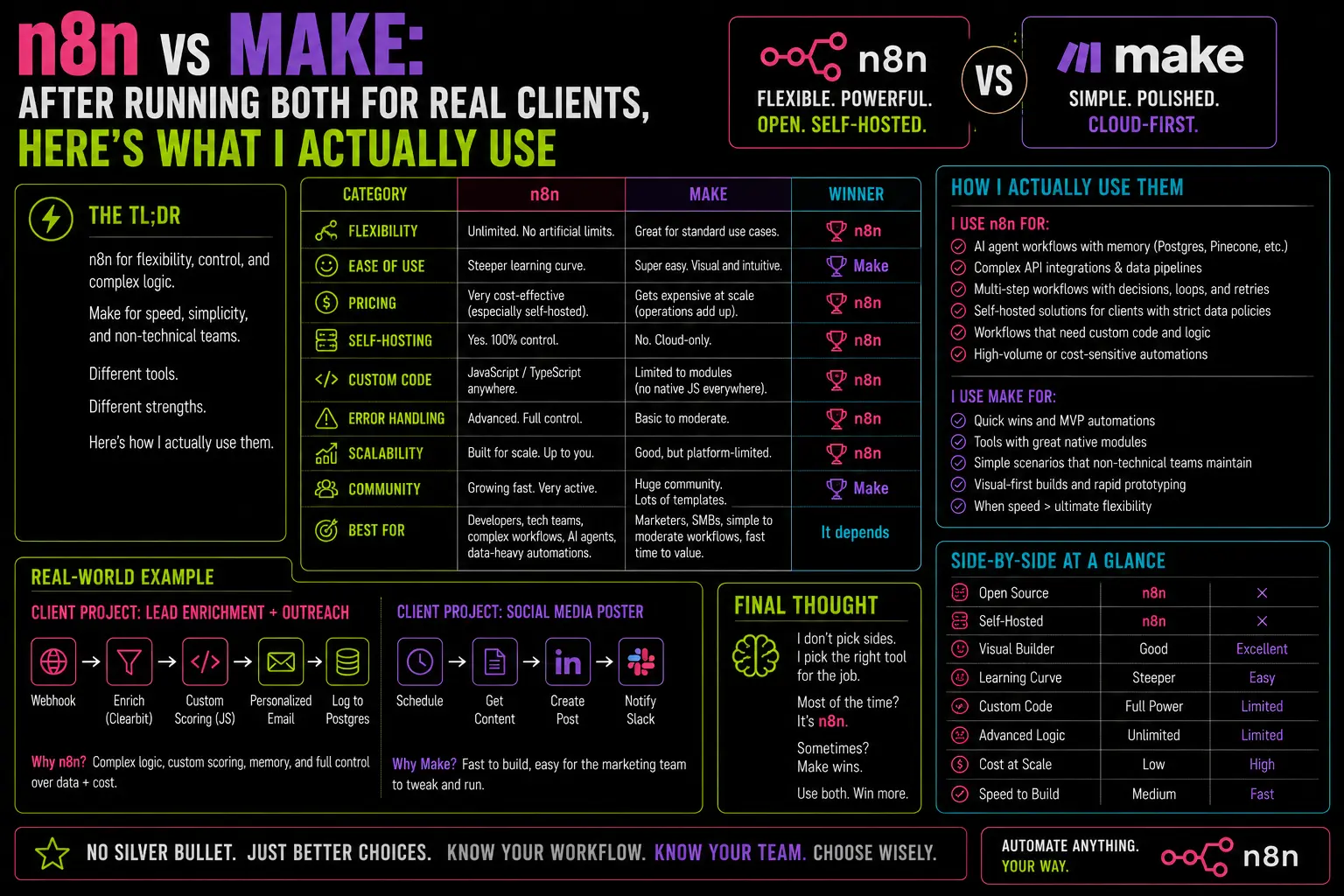
I started on Make. Paid $9/month, thought it was the better-designed tool, and spent six months building client workflows on it. Then I moved to n8n. The gap between what I expected from each and what I actually got is the honest version of this comparison — not the one you find on review sites where both tools score 4.5 stars for slightly different reasons.
Before the switch: client workflows hitting operation limits in week three, cost climbing faster than the workload, and a WhatsApp integration I needed that required an HTTP Request node anyway — at which point I was paying Make $40/month to use their wrapper around the same API call I could make for free.
After: everything self-hosted, unlimited executions, and three hours of migration work I’ll never have to repeat.
The Pricing Model Gap Is Bigger Than It Looks
Make charges by operations — every node that executes in a workflow counts as one operation. A workflow with 8 nodes that runs 500 times a month = 4,000 operations. Their Core plan gives you 10,000 operations for $9/month. That sounds fine until you build something real.
A lead intake workflow that receives a webhook, checks Postgres for duplicate, enriches via an API, formats a message, sends to WhatsApp, logs the result, and sends a Telegram confirmation = roughly 8 nodes. Run 300 leads through it in a month and you’ve used 2,400 operations on that workflow alone. Add a daily sync, a weekly report, and two client monitoring workflows — and you’re on the $29/month plan by month two.
n8n self-hosted has no execution limit. Running it on a $6 VPS or Oracle’s always-free tier means the ceiling doesn’t exist. Build 40-node workflows. Run them 10,000 times a month. The infrastructure cost stays flat.
That’s not a small difference. Over a year with a moderately active client automation stack, I was on track to pay Make $348. n8n cost me $72 in server fees. The remaining $276 bought a meaningful chunk of OpenAI API credits.
Where Make Genuinely Wins
I’m not going to pretend n8n is better at everything. Make has real advantages and they’re worth knowing.
The visual editor is cleaner. Make’s scenario builder shows data flowing between modules with more visual clarity than n8n’s canvas. For non-technical clients who want to understand or lightly edit their own workflows, Make is easier to hand over. n8n’s canvas gets cluttered on complex workflows in a way that Make’s doesn’t.
The native integration library is broader. Make has several hundred native integrations with pre-built authentication and field mapping. n8n has a smaller native library — though the HTTP Request node and the Code node cover almost anything Make handles natively. The difference is setup time, not capability.
Team collaboration is more polished. Make’s multi-user scenario sharing is smoother than n8n’s self-hosted equivalent. If you’re running a team that needs to co-edit workflows without setting up their own n8n instance, Make is genuinely easier.
Where n8n Wins — and It’s Not Close for Technical Users
AI and LLM workflows. n8n’s Langchain integration is substantially better than Make’s AI module. The ability to build agents with real memory, tool use, and Postgres-backed conversation history — as I detailed in the agent memory post — isn’t something you can replicate in Make without significant workarounds. If you’re building anything AI-related, n8n is the clearer choice.
Error handling in production. Make has error handlers, but n8n’s Error Trigger workflow pattern gives you more control. Setting up a proper error notification system in n8n takes 20 minutes and works across every workflow. Make’s error handling is more per-scenario and harder to centralize.
The Code node. When a native integration doesn’t do exactly what you need, n8n’s Code node handles it in JavaScript without leaving the workflow. In Make, your equivalent is calling a webhook to an external service or piecing together multiple modules. The Code node is a significant productivity advantage for anyone comfortable writing basic JavaScript.
Data ownership. Your workflows, your credentials, your execution logs — all on your server. Make’s cloud holds everything. For clients with data sensitivity concerns, this is sometimes a requirement, not a preference.
The Head-to-Head
| Make Core ($9/mo) | Make Teams ($29/mo) | n8n Self-Hosted | |
|---|---|---|---|
| Monthly operations | 10,000 | 40,000 | Unlimited |
| AI/LLM workflow support | Basic | Basic | Advanced |
| Visual editor | Excellent | Excellent | Good |
| Native integrations | 1,500+ | 1,500+ | 400+ (+ HTTP/Code) |
| Error handling centralization | Limited | Limited | Strong |
| Data on your server | No | No | Yes |
| Annual cost (approx.) | $108 | $348 | $72 (VPS) or $0 |
Who Should Use Which
Use Make if: your team is non-technical, you need specific native integrations that n8n doesn’t have, or you’re building simple automation for a client who’ll manage it themselves post-handoff. The onboarding friction for n8n is real for people who aren’t comfortable with data structures and JSON.
Use n8n if: you’re a solo operator or developer, you’re building anything with AI agents or Postgres, you expect volume to grow, or you care about long-term cost. The self-hosting investment — one afternoon, roughly the process covered in the VPS setup guide — pays for itself in a few months.
I haven’t opened Make in over a year. That’s the honest answer to which one I use.
— axiomcompute