
Six months in, I had a lead intake workflow with 38 nodes. It worked. I was also completely unable to debug it when something went wrong because tracing a failure through 38 connected nodes — with branches, merges, and a handful of Set nodes that existed purely because I’d worked around a problem three weeks earlier and forgotten why — was genuinely painful. The workflow had become a system I maintained out of necessity rather than understood.
I broke it apart into sub-workflows over a weekend. The monolith became four focused workflows of 6–9 nodes each, called in sequence by a parent workflow that did almost nothing except orchestrate. That one architectural change is the thing I’d go back and do on day one if I could.
What Sub-Workflows Actually Are
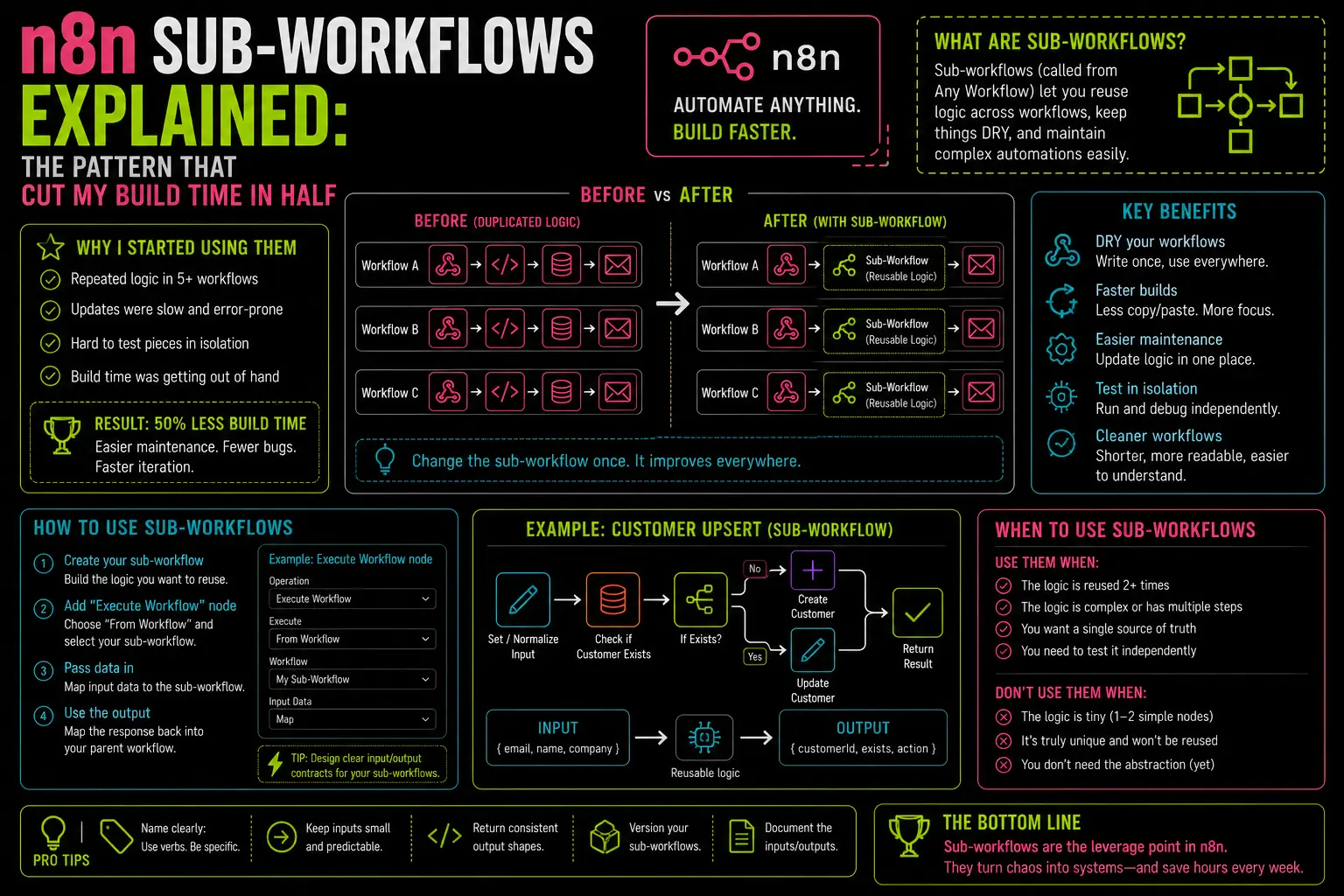
A sub-workflow in n8n is a normal workflow — it has a trigger, nodes, and outputs — but its trigger is the Execute Workflow Trigger node instead of a webhook or schedule. This means it only runs when another workflow calls it explicitly using the Execute Workflow node.
The calling (parent) workflow passes its current items into the sub-workflow. The sub-workflow processes them and returns results back to the parent, which continues from there. From the parent’s perspective, the Execute Workflow node behaves like any other node: data goes in, data comes out.
That’s the whole mechanism. The power is entirely in how you organize your logic around it.
When to Pull Logic Into a Sub-Workflow
There are three patterns where I reach for sub-workflows automatically:
You’re copying logic across multiple workflows. If you’ve built a “normalize incoming contact data” step in one workflow and you’re about to copy it into a second workflow, stop. Extract it into a sub-workflow once and call it from both. When the normalization logic needs to change — and it will — you change it in one place.
A section of a workflow has a single clear purpose. Any time I can describe a block of nodes in one sentence — “this part deduplicates the items by email” or “this part formats the Telegram notification” — that’s a sub-workflow candidate. Self-contained logic is easier to test in isolation, easier to understand when you return to it later, and easier to replace when requirements change.
You need to reuse a workflow across different trigger types. I have a “process new lead” sub-workflow that gets called from a webhook trigger, a scheduled Postgres poll, and a WhatsApp intake workflow. The processing logic lives once. Each trigger workflow does its own normalization and then hands off to the same sub-workflow.
Building It: The Execute Workflow Node
On the parent side, the Execute Workflow node has two required settings:
- Workflow: select the sub-workflow by name from your n8n instance
- Mode: “Run Once with All Items” (passes the full array to the sub-workflow at once) or “Run Once for Each Item” (calls the sub-workflow separately for each item, like a forEach)
For most use cases — deduplication, enrichment, formatting — you want “Run Once with All Items” so the sub-workflow can operate on the set. For cases where each item needs fully independent processing, use the per-item mode.
On the sub-workflow side, the Execute Workflow Trigger node has no required configuration. It sits at the start, receives whatever items the parent passed, and the rest of the workflow runs as normal.
To return data back to the parent: the last node in the sub-workflow determines what gets returned. Whatever items exit the final node are what the parent’s Execute Workflow node receives as output. If you want to return transformed items, make sure your last node is producing what you want — a Set node or Code node at the end works well for explicit output shaping.
Error Handling Across the Boundary
This is the part that surprises most people. If a sub-workflow throws an error, that error propagates up to the parent workflow. The parent’s Execute Workflow node fails, and if the parent has an error workflow configured, it fires with the sub-workflow’s error message included.
In practice: configure your error workflow on the parent, not on each sub-workflow individually. The error message will tell you which sub-workflow failed and why. If you want sub-workflow errors to be handled locally — without surfacing to the parent — you need to add a try-catch equivalent inside the sub-workflow itself using the Stop and Error node and Continue on Fail logic.
I centralize error handling at the parent level. Sub-workflows are intentionally thin on error handling so failures are visible. The parent’s error workflow catches everything and logs it to the same Postgres error table I covered in the error handling post.
A Real Example: Four Sub-Workflows From One Monolith
The 38-node workflow I mentioned became:
Parent workflow (9 nodes):
Webhook Trigger→ Execute Workflow: "normalize-lead-data"→ Execute Workflow: "deduplicate-by-email"→ Execute Workflow: "enrich-via-clearbit"→ Execute Workflow: "route-to-crm-and-notify"
Each sub-workflow is 6–10 nodes. Each does one thing. I can open “deduplicate-by-email,” understand it in 30 seconds, and change it without touching anything else. When the enrichment API changed their response format, I updated one sub-workflow while the other three ran unchanged.
The debugging experience improved dramatically. When an error fires, the error message names the sub-workflow. I open that one workflow, look at 8 nodes instead of 38, and find the problem in minutes rather than half an hour.
One Limitation Worth Knowing
Sub-workflows on n8n self-hosted run in the same process as the parent by default. This means they share the same memory and CPU — you’re not getting parallelism automatically. If you call a sub-workflow in “Run Once for Each Item” mode with 500 items, it’s running sequentially, not in parallel.
For parallel execution of independent items, you’d need n8n’s Queue Mode with multiple worker processes — which is its own setup. For most production workflows processing dozens to low hundreds of items, sequential execution is fast enough and the organizational benefit of sub-workflows is worth it regardless.
The Code node handles many things that would otherwise require a sub-workflow, so the two patterns complement each other. If the logic fits in 10 lines of JavaScript and has no reuse case elsewhere, keep it in a Code node. If it’s complex enough to need multiple nodes or you’re going to call it from more than one place, make it a sub-workflow.
Thirty-eight nodes taught me this lesson once. I haven’t needed to learn it again.
— axiomcompute