
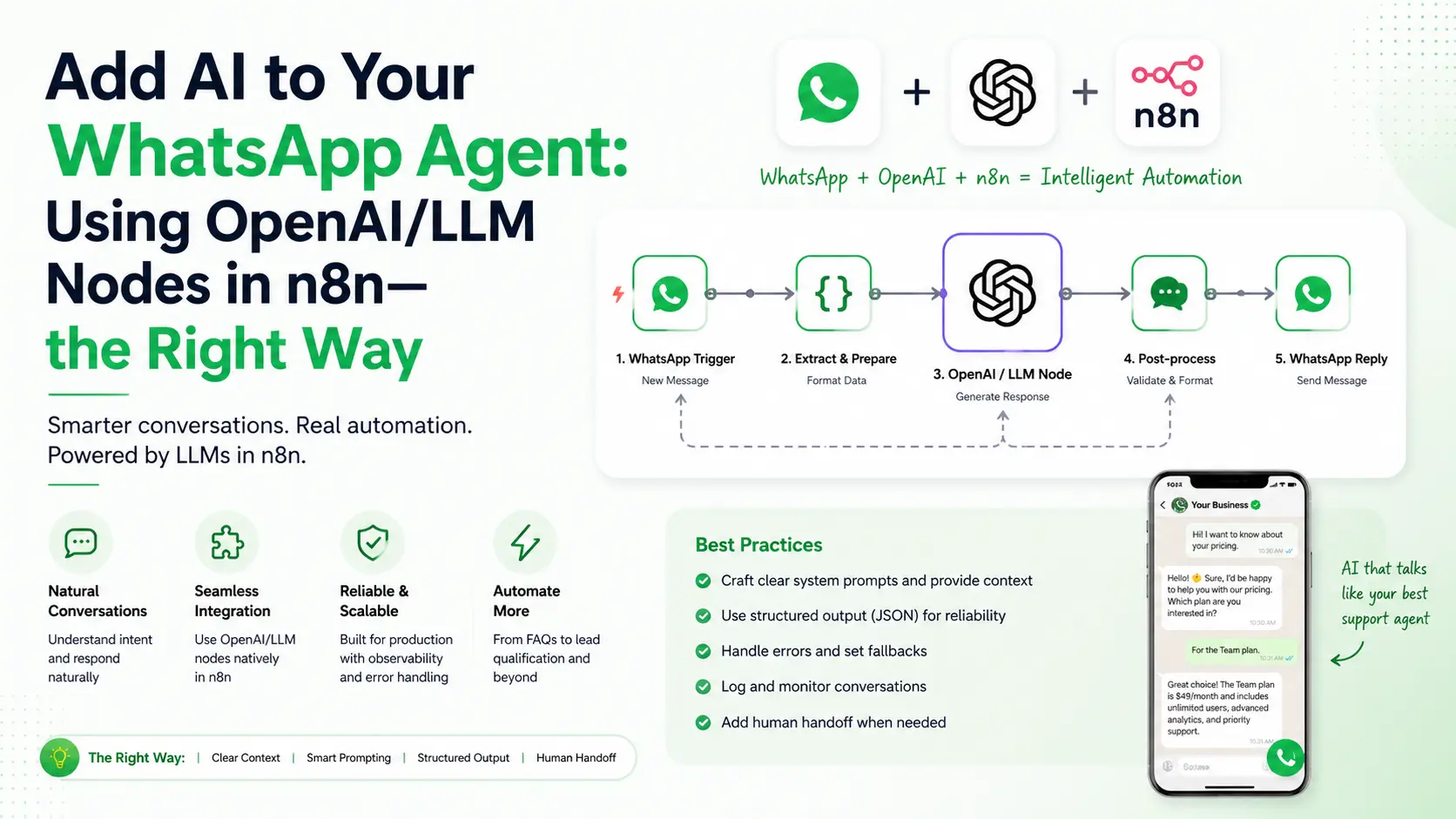
So we’ve already built our WhatsApp agent in n8n — receiving messages, saving leads, sending replies. It works. But it feels kinda…dumb. Every reply is hardcoded. Every classification is based on if-else rules. The bot can’t actually understand what the user is saying. That’s the gap AI fills, and that’s exactly what we’re going to fix today.
In our WhatsApp Lead Agent blog we touched the OpenAI node briefly — used it for intent detection and lead scoring. But I never sat down and explained how to use LLM nodes properly in n8n. The prompting, the model choice, the JSON parsing, the cost control, the multi-agent patterns — there’s an art to it. Doing it wrong means burned API credits and garbage responses. Doing it right means a bot that genuinely feels intelligent.
Today’s session is dedicated to that. By the end you’ll know how to add OpenAI nodes the right way, how to chain multiple LLMs into an orchestrator cluster, and how to keep cost’s under control. If you don’t already know me, hello — name’s ‘axiomcompute’. let’s start.
OpenAI Node vs AI Agent Node
First thing first — n8n actually has multiple AI nodes and most beginners get confused which one to use. Let me clear it up:-
| Node | What It Does | When To Use |
|---|---|---|
| OpenAI | Single LLM call — send prompt, get response | Classification, summarization, simple replies |
| AI Agent | LLM with tool-calling, memory, multi-step reasoning | Complex tasks needing decisions across multiple tools |
| Basic LLM Chain | Linear LLM call with prompt template | Quick prototypes, no tools needed |
| Sentiment Analysis | Pre-built sentiment scoring | When you just need pos/neg/neutral |
| Information Extractor | Pulls structured data from text | Extracting names, emails, dates from messages |
Note:- 90% of WhatsApp agent tasks need only the plain OpenAI node. Don’t over-engineer with AI Agent unless you actually need tool-calling. More complexity = more failure points.
Rule of thumb: if your task is “look at this text and decide one thing” → OpenAI node. If your task is “look at this text, then do A, then maybe do B based on result” → AI Agent node.
Choosing the Right Model (Don’t Default to GPT-4)
This is where everyone burns money. They drag the OpenAI node, see gpt-4 in the dropdown, select it, and then wonder why their API bill is ₹2000-₹3000 a week. For a WhatsApp agent, GPT-4 is overkill 95% of the time.
Here’s the realistic breakdown for our use case:-
| Model | Cost (Input/Output per 1M tokens in $) | Speed | Best For |
|---|---|---|---|
| gpt-4o-mini | $0.15 / $0.60 | 1-2s | Default choice — classification, replies, scoring |
| gpt-4o | $2.50 / $10 | 2-4s | Complex reasoning, long conversations |
| gpt-3.5-turbo | $0.50 / $1.50 | 1s | Legacy — gpt-4o-mini beats it now |
| o1-mini | $3 / $12 | 5-15s | Multi-step reasoning (rarely needed for WhatsApp) |
Important:- Always start with gpt-4o-mini. Test the workflow. Only upgrade to gpt-4o if you see actual quality issues. I’ve shipped production agents handling 50,000+ messages a month on gpt-4o-mini alone — total bill under ₹4000. Same workload on gpt-4o would be ₹30,000+. Big diffrence.
Prompt Engineering for WhatsApp Agents
A prompt is not just “what you ask the AI”. It’s the entire instruction set that defines how the AI behaves. Bad prompt = garbage output, no matter how good the model is. Let me share the prompt structure I use for almost every WhatsApp agent task.
The 4-Layer Prompt Template
- Layer 1 — Role: Who is the AI pretending to be?
- Layer 2 — Task: What exactly should it do?
- Layer 3 — Format: How should the output look?
- Layer 4 — Examples: Show 1-2 input/output pairs (few-shot)
Here’s a real example for an intent classifier — paste this in the System Prompt field of OpenAI node:-
# ROLE
You are an intent classification expert for a B2B WhatsApp business bot.

# TASK
Read the user message and classify it into one of these intents:
- buy: ready to purchase
- pricing: asking for cost/plans
- demo: wants a demo or trial
- info: general questions about product
- support: existing customer needs help
- spam: irrelevant or promotional junk
- greeting: hi, hello, namaste etc

Also detect urgency from 1 (low) to 5 (immediate).

# FORMAT
Return ONLY a JSON object, no markdown, no explanation:
{
  "intent": "string",
  "urgency": number,
  "confidence": 0.0-1.0
}

# EXAMPLES
Input: "How much is it?"
Output: {"intent":"pricing","urgency":2,"confidence":0.95}

Input: "I want to buy enterprise plan today"
Output: {"intent":"buy","urgency":5,"confidence":0.99}

Input: "hi"
Output: {"intent":"greeting","urgency":1,"confidence":0.99}
Then in the User Prompt field just put: User message: "{{ $json.wa_text }}"
Why this works:- The role gives context, the task is specific, the format is enforced, the examples teach the model your exact style. With this 4-layer structure, gpt-4o-mini gives near 100% accuracy on intent classification.
JSON Mode: Stop Fighting With Markdown
Biggest pain point with LLMs in automation — they love returning markdown wrappers like ```json {...} ```. Your downstream Code node tries to parse it, throws error, workflow breaks. Frustrating right? (Even if you do not understand, worry not, you will get it soon when you’ll try to build one for yourself.
n8n’s OpenAI node has a setting called Response Format. Change it from “Text” to “JSON Object”. This forces the model to return parseable JSON. Combined with explicit “return only JSON” instruction in your prompt, you’ll never see markdown again.
But just to be safe, always add a cleanup snippet in your downstream Code node:-
let raw = $input.first().json.message.content;

// Defense in depth: strip markdown if AI sneaked it in
raw = raw.replace(/```json|```/g, '').trim();

let result;
try {
  result = JSON.parse(raw);
} catch (e) {
  // Fallback to safe defaults instead of crashing
  result = {
    intent: 'info',
    urgency: 1,
    confidence: 0
  };
}

return [{ json: result }];
Note:- Always have a fallback. AI is non-deterministic — even with JSON mode, it can occasionally fail. Your workflow should never break because of one bad response.
Temperature, Top-P, and Other Magic Knobs
When you expand “Options” on the OpenAI node, you’ll see scary parameters like temperature, top_p, frequency_penalty etc. Most tutorials never explain these. So here is the Quick decoding:-
| Parameter | What It Does | Recommended Value |
|---|---|---|
| temperature | Randomness/creativity (0=deterministic, 2=wild) | 0.2 for classification, 0.7 for replies |
| max_tokens | Cap on response length | 200-500 for replies, 100 for JSON tasks |
| top_p | Alternative to temperature, controls diversity | Leave at 1 if using temperature |
| presence_penalty | Discourages topic repetition | Leave at 0 for most tasks |
Important:- For classification, scoring, extraction tasks — keep temperature LOW (0.1-0.3). You want consistent answers, not creativity. For drafting WhatsApp replies — bump it to 0.6-0.8 so replies feel natural and varied.
The Multi-Agent Orchestrator Pattern
This is the advanced part — what serious automation builders actually do in production. Instead of one big LLM doing everything, you chain multiple specialized LLMs each doing one job well. This is called a multi-agent orchestrator cluster.
For our WhatsApp agent, here’s the cluster I recommend:-
Incoming Message
       ↓
[Agent 1: Spam Filter]   ← gpt-4o-mini, temp 0.0
       ↓ (if not spam)
[Agent 2: Intent Classifier]  ← gpt-4o-mini, temp 0.2
       ↓
[Agent 3: Reply Drafter]  ← gpt-4o-mini, temp 0.7
       ↓
[Agent 4: Tone Validator]  ← gpt-4o-mini, temp 0.0
       ↓
Send to WhatsApp
Why this works better than one mega-prompt:-
- Each agent has a focused job: easier to prompt, easier to debug
- Different temperatures per task: classification stays consistent, replies stay creative
- Failure isolation: if reply drafter fails, you still have classification data
- Cheap: 4 calls to gpt-4o-mini ≈ 1 call to gpt-4o, but with much better control
- Composable: swap any agent without touching others
Pro tip:- Add a Merge node after each parallel agent run, then a final Code node that combines all agent outputs into one clean object before sending the WhatsApp reply. Keeps your data flow predictable.
Memory: Making the Agent Remember Context
A WhatsApp agent that doesn’t remember previous messages feels broken. User asks “how much is it?”, bot replies pricing. User says “yes”, bot has no clue what “yes” refers to. We need conversation memory.
Two ways to do this in n8n:-
Method 1: Database-Backed Memory (Recommended)
Before the OpenAI node, add a Postgres query that fetches last 5 messages for this user (we set up Postgres in our Neon Postgres blog):-
SELECT direction, content, created_at
FROM whatsapp_messages
WHERE lead_id = $1
ORDER BY created_at DESC
LIMIT 5;
Then in a Code node, format this into a conversation string and inject into your prompt:-
const history = $input.first().json
  .reverse()
  .map(m => `${m.direction === 'inbound' ? 'User' : 'Bot'}: ${m.content}`)
  .join('\n');

return [{
  json: {
    conversation_history: history,
    current_message: $('Parse Message').first().json.wa_text
  }
}];
Now your AI prompt has full context: “Here’s the conversation so far… User just sent: … Reply naturally.”
Method 2: AI Agent Node with Memory
n8n’s AI Agent node has a built-in Memory sub-node (Window Buffer Memory, Postgres Memory, etc). Connect it as a memory provider and it auto-handles context. Simpler but less control.
Cost Control: Real Tactics That Save Money
Let’s be real & practical, you are going to burn money! When it’s your first time building these. OpenAI bills can spiral fast if you’re not careful. Here’s what I do for every production agent:-
- Spam filter BEFORE the LLM:- A simple regex/keyword check that catches obvious spam without burning API credits. Cuts 20-30% of LLM calls instantly.
- Cache common replies:- If 50 users ask “what are your timings?”, you don’t need 50 LLM calls. Hash the question, cache the answer for 24 hours.
- Limit max_tokens aggressively:- A WhatsApp reply doesn’t need 1000 tokens. Cap it at 200. Saves money on output (which costs 4x input).
- Use system prompt wisely:- System prompt is sent on EVERY request. Keep it under 300 tokens. I’ve seen people with 2000-token system prompts wondering why bills are huge.
- Batch when possible:- If you have non-urgent classification jobs (like nightly lead re-scoring), use OpenAI’s Batch API — 50% cheaper, 24h turnaround.
- Set monthly hard limit:- In OpenAI dashboard set usage limits. Worst case scenario you lose service for a day, not your bank balance.
Common Mistakes I See Everyone Make
- Using OpenAI for what regex can do:- Don’t use AI to extract a phone number — regex does it free in 1ms. Save AI for tasks needing actual understanding.
- No fallback if AI fails:- What if OpenAI is down for 10 minutes? Your entire WhatsApp bot stops working. Always have a fallback path (canned reply or human handoff).
- Sending raw user input to AI:- Users send weird stuff — emojis, foreign scripts, prompt injection attempts (“ignore previous instructions and…”). Sanitize input. Truncate length. Strip control characters.
- Forgetting timeout:- Default OpenAI node timeout is generous. If API is slow, your WhatsApp user waits 30 seconds. Set timeout to 8-10s and use a fallback reply.
- Not logging AI responses:- When something goes wrong (and it will), you need the raw AI output to debug. Log every single LLM call to your database — input, output, tokens used, model, timestamp.
- Hardcoding API key in node:- Always use n8n credentials. Never paste the key directly. We covered this in our security blog.
Connecting It All Back to Your WhatsApp Agent!
The Fun part, Remember our WhatsApp Lead Agent workflow with 27 nodes? Here’s where each AI piece fits in that build:-
| Workflow Stage | AI Pattern To Use |
|---|---|
| Node 13: AI Lead Analyzer | OpenAI node, gpt-4o-mini, JSON mode, temp 0.2, 4-layer prompt |
| Node 19: Generate Response | OpenAI node, gpt-4o-mini, temp 0.7, with conversation history |
| Hot lead detection | Code node logic, no AI needed (rule-based on score) |
| Tone validation (optional) | Second OpenAI node with role: “rate this reply tone 1-10” |
Plug these patterns into your existing workflow and suddenly the bot goes from “robotic if-else machine” to “actually understands what user wants” — same n8n nodes, just used the right way.
Conclusion
So We went from “what is an OpenAI node” to building a full multi-agent orchestrator cluster with memory, fallbacks, and cost control. If you’ve followed along, your WhatsApp agent is now in the top 5% of n8n setups out there. Most people just drag the OpenAI node and pray.
The biggest lesson here is honestly very simple — AI is a tool. The model doesn’t make your bot smart. It’s the way YOU prompt it, structure the data, chain the nodes, and handle failures is what makes the bot smart. n8n + OpenAI is just lego blocks and you are the architect.
Going forward, experiment with the multi-agent pattern in your existing workflows. Replace one mega-prompt with three small focused prompts and watch quality jump. Try gpt-4o-mini at temperature 0.2 for classification, 0.7 for drafts. Log everything. Set spending limits. These small habits compound into a genuinely production-grade AI agent.
For the workflow JSON template or any doubts, drop a mail at admin@techmov.in. Until next blog — keep prompting, keep building. See you in next blog!!
FAQ Section
For most WhatsApp agents use gpt-4o-mini. It’s cheap (around $0.15 per million input tokens), fast (1-2 second responses), and accurate enough for intent classification, summarization, and reply generation. Switch to gpt-4o only when you need complex reasoning or long context understanding.
OpenAI node is a single LLM call: send a prompt, get a response. AI Agent node is more powerful — it can use tools (other nodes as functions), maintain memory, and run multiple LLM iterations to complete a task autonomously. Use OpenAI node for simple classification, use AI Agent for multi-step tasks.
Set Response Format to “JSON Object” on the OpenAI node and explicitly tell the model in the system prompt to return only valid JSON without markdown wrappers. Also add a cleanup line in your Code node that strips ```json wrappers as a safety net.
Three things: use gpt-4o-mini instead of gpt-4o, keep system prompts short, and add a spam filter before the LLM call so junk messages don’t trigger paid API requests. Also set max_tokens limit to avoid runaway responses.
Yes, this is called an AI orchestrator or multi-agent cluster pattern. One model classifies the message, another drafts the reply, a third one validates tone — each specialised for its task. n8n lets you chain them with Switch and Merge nodes.