
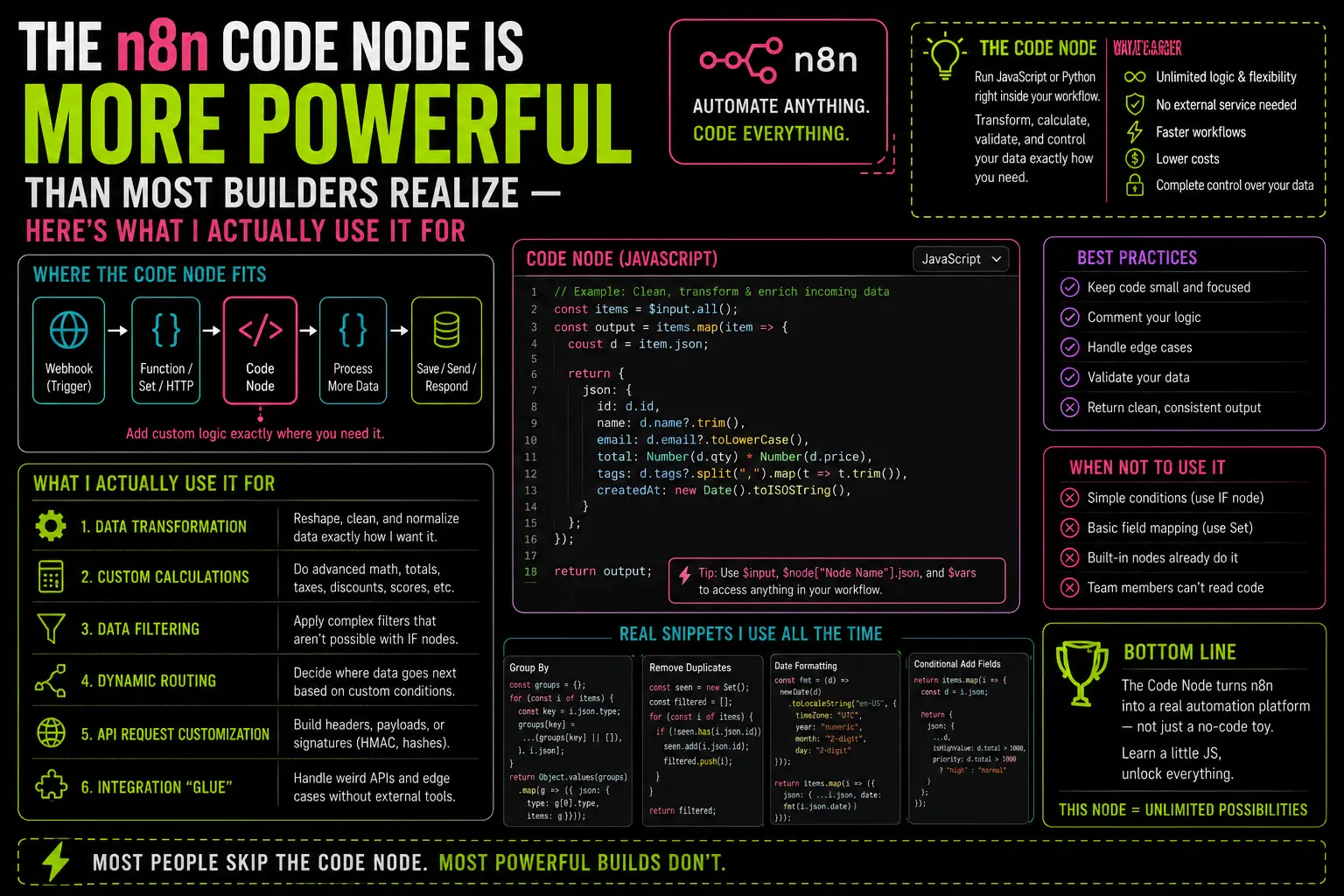
The Code node is not for “real developers.” That framing is why most n8n builders never touch it — and why their workflows end up three times longer than they need to be, patched together with Set nodes and IF nodes doing work that six lines of JavaScript would handle cleanly.
I avoided it for months. I assumed it existed for edge cases I wouldn’t hit. Then I hit one, opened the Code node out of desperation, wrote eight lines, and closed a problem I’d been working around for two weeks. That was the last time I built a workflow without considering it first.
What It Actually Is
The Code node runs JavaScript (or Python, your choice) directly inside your workflow. It receives items from the previous node, you write a function that transforms them, and it passes the result to the next node. That’s it.
The one distinction worth knowing upfront: it runs in two modes. Run Once for All Items gives you the full array of incoming items to work with at once — useful when you need to compare, deduplicate, or aggregate across the set. Run Once for Each Item processes items one by one, like a forEach loop. Most tutorials only show the second mode. The first one is often where the real power is.
What it can’t do by default: import external npm packages. The standard n8n installation doesn’t allow arbitrary require() calls. You get the full JavaScript standard library — which is more than enough for 90% of what you’ll actually need.
Five Things I Use It For in Production
1. Deduplicating items by a field
n8n has no built-in deduplication node that works well across arbitrary fields. When I’m pulling records from an API that occasionally returns duplicates — which is most APIs — this is what goes at the top of my cleanup workflow:
const seen = new Set();return items.filter(item => {const key = item.json.email;if (seen.has(key)) return false;seen.add(key);return true;});
Two seconds to write. Replaces a convoluted IF + Merge workaround I used to use that added four nodes and still had edge cases.
2. Parsing messy webhook payloads
Webhooks don’t always arrive clean. I’ve worked with form tools that send everything as a flat string in one field, CRMs that concatenate first and last name, and APIs that return phone numbers in six different formats depending on the country code. The Code node handles all of it. Here’s one I use regularly for normalizing phone numbers before they go into Postgres:
return items.map(item => {let phone = item.json.phone.replace(/\D/g, '');if (phone.length === 10) phone = '1' + phone;return { json: { ...item.json, phone_normalized: '+' + phone } };});
The alternative was a four-node chain of Set and Function Item nodes that was harder to read than the code itself.
3. Generating URL slugs
I build a lot of workflows that write content or records with URLs. Generating a proper slug — lowercase, hyphens for spaces, special characters stripped — is a one-liner, but there’s no native n8n node for it. The Code node makes it a ten-second addition:
return items.map(item => {const slug = item.json.title.toLowerCase().replace(/[^a-z0-9\s-]/g, '').trim().replace(/\s+/g, '-');return { json: { ...item.json, slug } };});
4. Calculating derived values
Reading time, word count, percentage change, days since a timestamp — any time you need to compute something from incoming data, the Code node is faster and more readable than trying to do math inside n8n expressions. Word count for a content workflow:
return items.map(item => {const words = item.json.content.trim().split(/\s+/).length;const readingTime = Math.ceil(words / 200);return { json: { ...item.json, word_count: words, reading_time_min: readingTime } };});
5. Flattening nested JSON
APIs return nested objects. Postgres wants flat rows. The Code node bridges that gap without requiring a Merge node and three Set nodes to pull out the fields you need:
return items.map(item => {const { id, name, address: { city, country }, meta: { created_at } } = item.json;return { json: { id, name, city, country, created_at } };});
The Mindset Shift
The way I think about it now: the Code node is the escape hatch for any step where you’re fighting n8n’s built-in nodes instead of using them. If you’re stacking more than two Set nodes to transform a single field, or you’ve got an IF chain handling something that’s really just string logic, that’s a signal. The API fetching workflow I documented earlier would’ve been messier without it — the data cleaning step alone used three Code nodes to handle format variations across different API responses.
One thing worth knowing if you’re newer to n8n: the 10 basic nodes post covers the nodes you’ll use in 80% of workflows. The Code node sits outside that 80% — but when you need it, nothing else comes close.
The n8n docs for the Code node are actually decent for the syntax details. What they don’t tell you is when to reach for it. That’s the part that takes a few months of building real workflows to develop an instinct for.
Six lines of JavaScript is not a lot of code. It’s often the difference between a workflow that works and a workflow that works without requiring you to explain it to yourself a month later.
— axiomcompute